Reverse Engineering for Beginners - Hands-On Labs
Introduction
In this post, I continue my studies of the course ‘Reverse Engineering for Beginners’ from Red Team Leaders, putting into practice some of the concepts presented throughout the lessons.
In this lesson, I worked with the practical cracking labs for Linux, analyzing different CrackMe-type challenges. The exercises cover everything from simple password checks to multi-step validations, involving techniques like string analysis, debugging, and identifying the logic used by the program to validate the input provided.
The goal was to solve the challenges by analyzing the behavior of the binaries, aiming to understand their internal logic and identify the information needed to overcome each step of the validation.
crackme1
Goal
Find the hardcoded password and enter it to see the success message.
Recon
1 | > file crackme1 |
Here we know that it is a 64-bit ELF binary.
Let’s look at all possible strings in the binary with the strings command (I’ll only leave the interesting ones):
1 | r3vers1ng_101 |
Here we possibly already have the password and the flag obtained that we need to complete the challenge, but let’s go further.
Static analysis
We can also check out some interesting sections (.rodata) of the binary to see a bit of its data and functionalities.
1 | 402000 01000200 00000000 72337665 7273316e ........r3vers1n |
Analyzing the binary’s functions, we clearly find where the verification of the password provided by the user (check_password) is done, let’s see what it possibly does:
1 | > objdump -M intel -d crackme1 | grep -A 20 "<check_password>:" |
Inside the function, he uses ‘strcmp’ to compare the password provided with the user (rdi) to the correct password (rsi) expected by the program.
Dynamic analysis
Right off the bat, let’s go straight to where we know we’ll find the correct password in ‘strcmp’ inside the ‘check_password’ function:
1 | → 0x40119b <check_password+0025> call 0x401070 <strcmp@plt> |
Running the binary by providing the correct password:
1 | ./crackme1 |
crackme2
Find the password encoded with XOR in the binary. The password isn’t stored in plain text – you need to find the encoding scheme and reverse it.
The binary works the same way as crackme1, but using XOR encryption, so we have the check_password function that I will explain line by line:
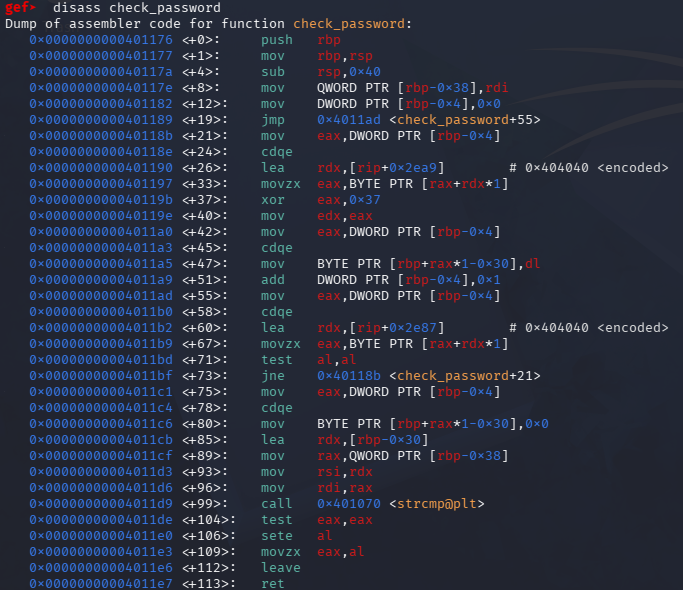
- Create the local variables
1 | push rbp |
Reserves 0x40 = 64 bytes on the stack for the function.
The main locations used are:
1 | [rbp-0x38] -> input (password provided by the user) |
- Save the input and initialize the counter
1 | mov QWORD PTR [rbp-0x38], rdi |
How RDI contains the first argument that was passed when calling this check_password function:
1 | [rbp-0x38] = input |
And:
1 | [rbp-0x04] = 0 |
So:
1 | i = 0; |
- Grab a character from
encoded
1 | mov eax, DWORD PTR [rbp-0x4] |
Here he uses the counter to access:
1 | encoded[i]; |
So, conceptually:
1 | i = 0; |
Later:
1 | i = 1; |
and so on…
- Decodes with XOR
1 | xor eax, 0x37 |
Do:
1 | encoded[i] ^ 0x37; |
This is the decoding process.
- Put the result in the buffer
1 | mov edx, eax |
The result of the XOR is placed in:
1 | buffer[i]; |
Remember:
1 | buffer starts at [rbp-0x30] |
Do:
1 | buffer[0] = encoded[0] ^ 0x37; |
- Increase the counter
1 | add DWORD PTR [rbp-0x4], 0x1 |
And simply:
1 | i++; |
- Check if it has reached the end of
encoded:
1 | mov eax, DWORD PTR [rbp-0x4] |
Checks:
1 | encoded[i] != '\0' |
If it hasn’t reached the end yet, go back to the start of the loop:
1 | -> take encoded[i] |
- Finish the buffer
1 | mov BYTE PTR [rbp+rax*1-0x30], 0x0 |
Put 0 at the end:
1 | buffer[i] = '\0'; |
Now buffer is a valid string.
- Compare with the input
1 | mov rsi, rdx |
Get ready:
1 | RDI -> input |
and call:
1 | strcmp(input, buffer); |
- Returns 1 or 0
1 | test eax, eax |
If strcmp() returns 0:
1 | input == buffer |
then it returns:
1 | 1 otherwise -> 0 |
As we know, in the call to strcmp() the encrypted buffer will be passed to compare with the string provided by the user, and this way we can see the expected string in plain text.
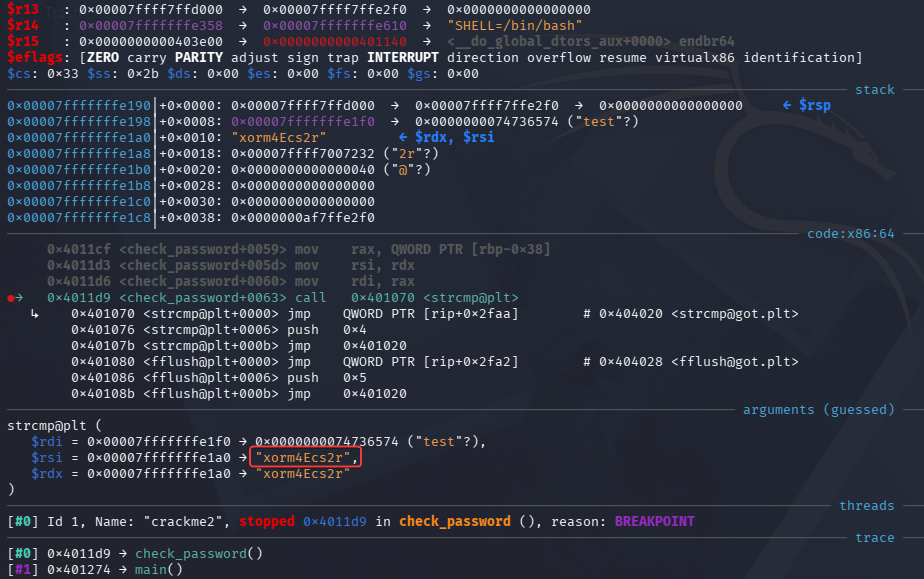
So, entering the correct password:
1 | ./crackme2 |
crackme3
Go through all three stages of validation. The password has a specific format, length, and character restrictions. You need to reverse engineer each stage separately.
In this binary, the password check goes through 3 stages: stage1, stage2, and stage3.
stage1
Let’s take a look at the stage1 code:
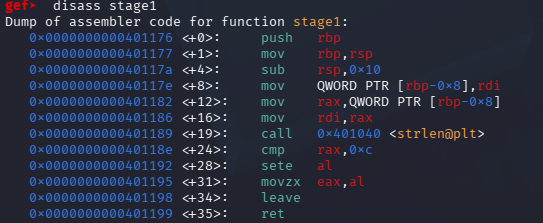
- Creates the stack frame:
1 | push rbp |
Reserves 0x10 = 16 bytes on the stack.
Here we have:
1 | [rbp-0x8] -> input |
- Save the input
1 | mov QWORD PTR [rbp-0x8], rdi |
RDI contains the first argument of the function.
So:
1 | [rbp-0x8] = input |
- Prepare the input for
strlen
1 | mov rax, QWORD PTR [rbp-0x8] |
It grabs the input and puts it into RDI.
Then it calls:
1 | strlen(input); |
The result of strlen() ends up in RAX.
- Compare the size with
0xc= 12.
1 | cmp rax, 0xc |
- Converts the result to true/false
1 | sete al |
sete means Set if Equal.
If:
1 | RAX == 12 |
then:
1 | AL = 1 |
Otherwise:
1 | AL = 0 |
After that, movzx turns it into an integer value:
1 | EAX = 1 |
- Return
1 | leave |
The call to the stage1 function returns in RAX:
1 | 1 -> input has exactly 12 characters |
stage2
Let’s look at the stage2 code:
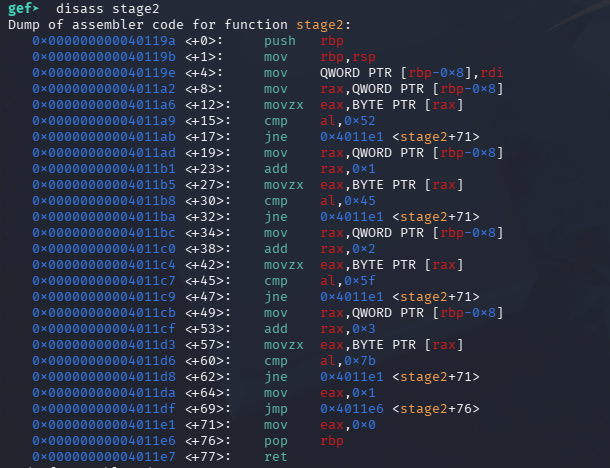
- Saves the input
1 | push rbp |
RDI contains the function argument, so:
1 | [rbp-0x8] -> input |
There’s no explicit counter, it directly accesses positions 0, 1, 2, and 3.
- Check the first character
1 | mov rax, QWORD PTR [rbp-0x8] |
[rax] means
1 | input[0]; |
And it compares with:
1 | 0x52 = 'R' |
So:
1 | input[0] == 'R' |
If it’s different, jne jumps to the end and returns 0.
- Check the next character
1 | mov rax, QWORD PTR [rbp-0x8] |
Here:
1 | rax = input + 1 |
So:
1 | input[1]; |
and compared with:
1 | 0x45 = 'E' |
Then:
1 | input[1] == 'E' |
- Check the third character
1 | mov rax, QWORD PTR [rbp-0x8] |
Now access:
1 | input[2]; |
And compare with:
1 | 0x5f = '_' |
So:
1 | input[2] == '_' |
- Check the fourth character
1 | mov rax, QWORD PTR [rbp-0x8] |
Accesses:
1 | input[3]; |
and compares with:
1 | 0x7b = '{' |
So:
1 | input[3] == '{' |
- If everything is correct:
1 | mov eax, 0x1 |
It returns:
1 | 1 |
If any of the comparisons fail:
1 | mov eax, 0x0 |
It returns:
1 | 0 |
Now, we know that
stage2checks if the first 4 characters of the provided 12-character string start with ‘RE_{‘.
stage3
Let’s look at the stage3 code:
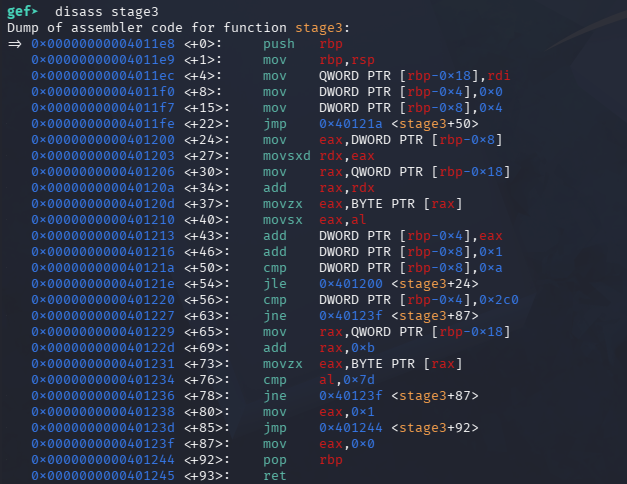
- Initialize the variables
1 | mov QWORD PTR [rbp-0x18], rdi |
We have:
1 | [rbp-0x18] -> input |
That is:
1 | int sum = 0; |
The counter starts at 4 because stage2 already checked positions 0 to 3.
- Grab
input[i]
1 | mov eax, DWORD PTR [rbp-0x8] |
Here it calculates:
1 | input[i] |
Since i starts at 4:
1 | input[4] |
movzx grabs the character as 1 byte, and movsx turns that byte into a signed integer.
In practice, for normal ASCII characters, we can just think of it as:
1 | int value = input[i]; |
- Adds the character
1 | add DWORD PTR [rbp-0x4], eax |
Adds the ASCII value to the variable sum:
1 | sum += input[i]; |
Ex:
1 | 'A' = 65 |
- Incrementing the counter
1 | add DWORD PTR [rbp-0x8], 0x1 |
And:
1 | i++; |
So the loop will process:
1 | i = 4 |
- Loop condition
1 | cmp DWORD PTR [rbp-0x8], 0xa |
0xa in hexadecimal is 10.
As long as:
1 | i <= 10 |
it keeps going.
So, there are 7 characters:
1 | input[4] to input[10] |
We can imagine the loop like this:
1 | for (i = 4; i <= 10; i++) |
- Check the sum
1 | cmp DWORD PTR [rbp-0x4], 0x2c0 |
0x2c0 in decimal:
1 | 0x2c0 = 704 |
So:
1 | if (sum != 704) |
In other words:
The sum of the ASCII values from
input[4]toinput[10]needs to be 704.
- Check the last character
If the sum is correct:
1 | mov rax, QWORD PTR [rbp-0x18] |
0xb = 11
Then it checks:
1 | input[11] |
counts:
1 | 0x7d = '}' |
So:
1 | input[11] == '}' |
- Return
If everything is correct:
1 | mov eax, 0x1 |
Returns:
1 | 1 |
If the sum is wrong or input[11] is not }.
1 | mov eax, 0x0 |
Returning:
1 | 0 |
In short
1
2
3
4
5[0] [1] [2] [3] [4] [5] [6] [7] [8] [9] [10] [11]
R E _ { ? ? ? ? ? ? ? }
└────────────┘ └──────────────────────────┘ └───┘
stage2 soma = 704 stage3
So, putting this together with the previous steps, we already know that the format is:
1 | RE_{???????} |
where the 7 need to have an ASCII sum = 704, and the last character is }.
In this case I used: d d d d d d h. Explanation:
1 | d = 100 |
Running crackme3 by providing the correct string:
1 | ./crackme3 |